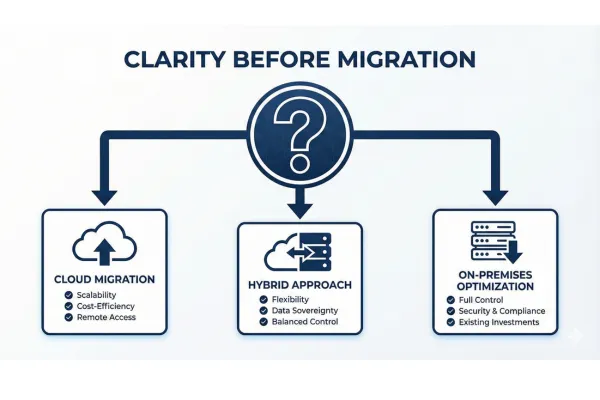
Legacy System to Cloud Migration: How to Know If It's Right for You
SUMMARY: Business owners often search for "cloud migration" when they're actually trying to solve different problems - slow applications, outdated software, or infrastructure issues. Before choosing a solution, you need to understand your actual problem. This guide helps you gain clarity by walking through diagnostic questions: What problem are you trying to solve? How do you know that's the real issue? Is cloud actually the right answer, or would hybrid infrastructure or on-premises optimization be better? We cover real scenarios where cloud makes sense (multiple locations, remote workforce, scalability needs) versus when it doesn't (high-speed local operations, budget constraints, code optimization needs). Most critically, we address data safety first- using a real example where a client's 40-year database was set to erase on shutdown with no backups for 3+ years.
Written by Jake Haynes, CEO of Pilot West Studios, based on our diagnostic-first approach to helping businesses modernize their legacy systems.
If you're reading this, you've probably searched "cloud migration" or "move to the cloud" because something isn't working with your current business systems.
Maybe your application is slow.
Maybe your software feels outdated.
Maybe you're worried about security or your server dying.
And you've heard that "moving to the cloud" will solve these problems.
But here's what I've learned after helping dozens of businesses modernize their systems:
People often say "cloud migration" when they actually mean something else entirely.
Sometimes they need application modernization.
Sometimes they need better hardware.
Sometimes they just need to optimize what they already have.
And jumping straight to "let's migrate to the cloud" without understanding your actual problem can cost you six figures and months of time—solving the wrong thing.
I'm Jake Haynes, co-founder of Pilot West Studios. We help non-technical business owners build profitable business systems. And our approach starts with one simple principle:
You can't choose the right solution until you understand the real problem.
This article isn't a step-by-step guide on HOW to migrate to the cloud.
There are plenty of those already.
This is about gaining clarity on WHETHER cloud migration is what you actually need—and if so, when it makes sense versus when other approaches might be smarter.
Let's start with the most important question.
What Problem Are You Actually Trying to Solve?
When business owners come to us talking about cloud migration, we don't immediately start discussing AWS versus Azure or migration timelines.
We start by asking: "What problem are you trying to solve?"
And here's what's interesting: The answer is rarely "I need to migrate to the cloud."
The real answers usually sound like:
"My application is too slow"
Reports take hours to run
The system crashes during busy periods
Users complain about lag
Everything freezes when too many people are logged in
"My software is outdated"
We're running Windows Server 2008 (or older)
We can't integrate with modern tools
The interface looks like it's from 1995
The developer who built it retired years ago
"I have security concerns"
We haven't had a security audit in years
We failed a compliance audit
I read about ransomware and realized we're vulnerable
A competitor got hacked and now I'm worried
"My hardware is failing"
The server is old
We've had crashes or downtime
We can't get replacement parts anymore
Our IT person keeps warning us about hardware failure
"We can't scale"
We're growing but our system can't handle more users
We have seasonal spikes that overload our servers
We're opening new locations and need better access
We want remote employees but our system only works locally
"We need better access"
Team members work remotely and can't access what they need
We have multiple locations that need to share data
We want mobile access but our system is desktop-only
Here's the key insight: All of these are legitimate problems. But they don't all require cloud migration.
Some of them need application modernization.
Some need optimization.
Some need better hardware.
Some need hybrid approaches.
And some—yes—genuinely need cloud migration.
But you can't know which solution fits until you clearly define which problem you're actually facing.
How Do You Know That's the Real Problem?
This is where most business owners get stuck.
You know something isn't working. But is it the hardware? The software? The database? The network? All of the above?
Here's how to drill down to the actual root cause:
If You Think: "My Application Is Slow"
Ask yourself these diagnostic questions:
When is it slow?
All the time? Or only at certain times of day?
Only when running specific reports or features?
Only when many users are logged in?
What specifically is slow?
Loading pages?
Running reports?
Searching for records?
Saving data?
Everything?
How many users do you have? Has that grown recently?
If usage has increased significantly, it might be a capacity issue
If usage is the same but it's gotten slower, it's probably not a capacity problem
What does "slow" mean in actual numbers?
Reports that used to take 10 minutes now take 2 hours?
Pages that loaded instantly now take 30 seconds?
Get specific—it helps identify the cause
The real problem might be:
Hardware limitation (old server, not enough RAM, slow hard drive) → Could need cloud OR just better on-prem hardware
Database issues (poor indexing, inefficient queries, bloated data) → Needs optimization, not necessarily migration
Bad code (inefficient programming, memory leaks) → Needs application fixes, not infrastructure changes
Network problems (slow internet, bad WiFi, distance between locations) → Infrastructure issue, not cloud vs. on-prem
See how the same symptom ("it's slow") could have completely different root causes?
If You Think: "My Software Is Outdated"
Ask yourself:
What makes it feel outdated?
The way it looks (UI/UX)?
The features it's missing?
The technology it's built on?
The fact that nobody supports it anymore?
What can't you do that you need to do?
Integrate with modern tools (CRM, accounting, etc.)?
Access it from mobile devices?
Handle your current volume of business?
Get the reports you need?
Is it still supported?
Can you still get updates and patches?
Is the vendor still in business?
Does anyone know how to work on this technology anymore?
The real problem might be:
UI/UX is dated → May need redesign, not migration
Missing modern features → Needs application modernization, not necessarily cloud
Can't integrate → Needs API development or modernization, might not need cloud
Technology is obsolete → Might need full rebuild (cloud could be part of that)
Security vulnerabilities → Needs patching OR replacement
Again, "outdated" means different things with different solutions.
If You Think: "I Have Security Concerns"
Ask yourself:
What specific concerns?
Compliance requirements (HIPAA, SOC 2, PCI, etc.)?
No backup or disaster recovery plan?
Old, unpatched software with known vulnerabilities?
Physical security (server in a closet, accessible to anyone)?
General worry about ransomware/breaches?
Has anything happened, or is this preventative?
If you've had a breach or near-miss, that's urgent
If this is preventative planning, you can be more thoughtful
What are you currently doing for backups?
Nothing? (This is critical)
Manual backups to external drives? (Better than nothing, but risky)
Automated backups? Where do they go?
The real problem might be:
No backup strategy → Cloud backup helps, but doesn't require full migration
Compliance requirements → Cloud providers have certifications that help, but you still need proper configuration
Old/unpatched software → Needs updates or replacement (not necessarily cloud)
Physical security concerns → Cloud removes hardware from your building, but is that really the main risk?
Access control issues → Might just need better policies and authentication
Security is important, but "moving to the cloud" doesn't automatically make you secure.
When Cloud Migration IS the Answer
Okay, so you've identified your actual problem. Now let's talk about when cloud migration genuinely makes sense.
Cloud is clearly the right direction when:
1. You Have Multiple Locations That Need Fast Access
If you have offices, warehouses, or retail locations in different cities (or countries), and they all need to access the same data in real-time, cloud starts to make a lot of sense.
With cloud, everyone accesses the same central system over the internet. No complex VPNs, no data syncing headaches.
Example scenario: A retail chain with 20 stores across the country. Each store needs real-time inventory and sales data. Cloud-based point-of-sale system makes this seamless.
2. You Have a Remote or Distributed Workforce
If your team works from home, travels frequently, or is spread across different locations, cloud access is usually the smoothest path.
Everyone can log in from anywhere with an internet connection. No VPN configurations, no "I can only access this from the office" limitations.
Example scenario: A consulting firm with remote employees across multiple states. Cloud-based project management and client systems mean everyone has access to what they need, wherever they are.
3. You Need Elastic Scalability
If your business has:
Seasonal spikes (retail during holidays, accounting firms during tax season)
Rapid growth with unpredictable usage increases
Variable loads that would require expensive over-provisioning on-premises
Cloud lets you scale up during busy periods and scale down when things are quiet. You pay for what you use.
Example scenario: An e-commerce business that does 70% of its annual sales in November-December. Rather than buying servers to handle Black Friday that sit mostly idle the rest of the year, cloud resources scale up for the holidays.
4. You Face Compliance or Certification Requirements
If you need SOC 2, HIPAA, PCI-DSS, or other compliance certifications, cloud providers already have these in place. You still need to configure things correctly, but the infrastructure baseline is there.
Building this level of compliance into your own data center is expensive and complex.
Example scenario: A healthcare startup that needs HIPAA compliance. Using AWS or Azure with HIPAA-compliant configurations is far easier than building a compliant on-premises infrastructure.
5. You Have No IT Staff to Manage Infrastructure
If you don't have (and don't want to hire) dedicated IT staff to manage servers, backups, security patches, and infrastructure, cloud reduces that burden significantly.
The cloud provider handles hardware maintenance, security patches, and infrastructure management. You focus on your business.
Example scenario: A 15-person professional services firm. They don't want to employ a full-time IT person just to maintain servers. Cloud infrastructure means they can focus on their actual business.
6. Disaster Recovery and Business Continuity Are Critical
If your business literally cannot afford downtime—if losing access to your systems for even a few hours would be catastrophic—cloud infrastructure with built-in redundancy and automated failover makes sense.
Example scenario: A logistics company where downtime means trucks sitting idle and deliveries missed. Cloud infrastructure with automatic failover to multiple data centers minimizes this risk.
7. You're Building Something New
If you're building a new application from scratch, cloud-native architecture often makes the most sense. You're not constrained by legacy decisions, and you can design for cloud from day one.
Example scenario: A startup launching a new SaaS product. Building cloud-native from the start is usually simpler than building for on-premises and migrating later.
When Cloud Might NOT Be the Answer
Here's where it gets interesting—and where the industry conversation is shifting.
There's an increasingly strong push to reconsider whether cloud is always the right solution. And there are legitimate scenarios where other approaches make more sense.
1. High-Speed Local Operations Between Multiple Sites
We recently worked with a large distribution company in Nashville with two warehouse locations.
They needed constant, real-time data synchronization between warehouses—inventory updates, order processing, shipping coordination.
Initially, they thought: "Cloud migration will solve this."
But when we analyzed their actual needs, local data transfer between the two warehouses was significantly faster than routing everything through cloud servers.
Think of it like this:
Cloud approach = Two neighbors having a conversation by calling a central office, leaving messages, waiting for the office to relay messages back and forth.
Local approach = Two neighbors talking directly across the fence.
For high-volume, constant data exchange between nearby locations, local networking is often faster and more reliable.
What we did instead: On-premises servers at each location with high-speed direct networking between them, PLUS cloud backup for disaster recovery. Best of both worlds—speed for operations, safety for backups.
This is called a hybrid approach, and it's increasingly common.
2. The Problem Is Actually Bad Code or Database Design
If your application is slow because of poorly written code, inefficient database queries, or bad data architecture, moving it to the cloud won't fix that.
You'll just have slow code running in an expensive cloud environment instead of on your local server.
The real solution: Optimize the code and database first. THEN decide if you need cloud.
3. Your Usage Is Stable and Predictable
If your usage is consistent (same number of users, same workload, no major spikes or valleys), cloud's elastic scaling advantage disappears.
You might actually pay more for cloud than buying and maintaining your own hardware.
Example: A manufacturing company with 50 employees, all working 8-5 Monday-Friday, using the same systems the same way for years. No growth planned, no remote workers, single location. The predictability means on-premises might be cheaper long-term.
4. Data Transfer Speed Is Critical
Some applications require extremely fast data access—real-time video processing, high-frequency trading, certain manufacturing control systems.
The latency of internet-based cloud access (even fast internet) might not meet your requirements. Local servers with direct, high-speed connections can be significantly faster.
5. You're Concerned About Long-Term Cloud Costs
Cloud is great for getting started quickly without major capital expenditure. But at scale, cloud costs can become significant—sometimes more expensive than owning your own infrastructure.
This is especially true if:
You have high data storage needs
You do a lot of data transfer (bandwidth costs add up)
Your usage is constant and high (you're always paying peak prices)
You need to do the math: What's the 3-year or 5-year total cost of cloud versus buying hardware?
For some businesses, buying servers makes more financial sense long-term.
6. You Only Need Better Backups
Sometimes the real need is just a solid backup and disaster recovery strategy.
You don't need to migrate your entire operation to the cloud. You can keep running locally and just back up to the cloud.
This gives you disaster recovery protection without the complexity and cost of full migration.
Hybrid approach: Run your application on local servers, automatically back up to AWS S3 or Azure Blob Storage. If something catastrophic happens locally, you can restore from cloud backups.
The Hybrid Approach: Often the Smartest Solution
Here's what we're seeing more and more:
The smartest infrastructure isn't "all cloud" or "all on-premises." It's hybrid.
Run day-to-day operations on whatever infrastructure makes sense for speed and cost.
Use cloud for backup, disaster recovery, and specific workloads that benefit from cloud capabilities.
This is exactly what we did for that distribution company:
Local servers for fast, high-volume warehouse operations
Cloud backup for disaster recovery and business continuity
Best of both worlds: speed + safety
Other common hybrid patterns:
Pattern 1: Operations On-Prem, Backups in Cloud
Your application runs on local servers (fast, reliable)
Everything backs up to cloud automatically (safe, redundant)
If local hardware fails, you can restore from cloud
Pattern 2: Core System On-Prem, Analytics in Cloud
Daily operations run locally (fast)
Data replicates to cloud for heavy reporting and analytics (cloud's processing power)
Keeps operational system responsive while enabling complex analysis
Pattern 3: Legacy On-Prem, New Features Cloud-Native
Existing system stays where it is (stable, working)
New capabilities built in cloud (modern, scalable)
Gradual migration as you rebuild piece by piece
The point: You don't have to choose between "all cloud" or "no cloud." Hybrid strategies often deliver the best outcomes.
The Critical First Step: Data Safety
Before we talk about ANY migration strategy—before you even decide if you need cloud—we need to address the most critical question:
Is your data safe right now?
Let me tell you a story that illustrates why this matters.
The Database Set to Self-Destruct
We recently worked with a membership organization managing 115,000+ members. They'd been running on the same system for over 40 years.
They came to us wanting to modernize and potentially migrate to the cloud.
Before we touched anything, we did what we always do: assessed their current infrastructure and data situation.
What we discovered was terrifying.
Their database—containing 40 years of irreplaceable member records, club affiliations, certifications, competition results, and organizational history—hadn't been backed up in over 3 years.
Worse, there was a setting in their InterSystems Caché database configured to automatically erase all data if the server ever shut down.
Read that again.
If that server lost power. If it crashed. If someone accidentally rebooted it. If there was any hardware failure.
40 years of data would vanish. Recovering the 3 years of unbacked up data would have taken weeks or months to recover manually from paper records.
And they had no idea. The previous owner who set up the system was long gone decades ago. The setting was buried in configuration files nobody had looked at in years.
They were one power outage away from catastrophic, unrecoverable data loss.
If we had proceeded with migration without discovering this, and something had gone wrong during the process—which can happen even with careful planning—they would have lost everything.
What We Did Immediately
Before discussing migration strategies or cloud options or anything else:
Created multiple redundant backups of their entire database
Fixed the "erase on shutdown" setting so they were no longer at risk
Documented their database schema (there was zero documentation)
Implemented automated backup procedures going forward
Only then—once we knew their data was safe—did we proceed with migration planning.
This Isn't Rare
You might think: "That's an extreme case. That won't happen to me."
But here's the uncomfortable truth: This kind of situation is more common than you think.
We've seen:
Databases with no backups for years (owners thought IT was handling it, IT thought someone else was handling it)
Backups that exist but have never been tested (and turn out to be corrupted when you actually need them)
"Backup" processes that are actually just copying files to another folder on the same server (if the server fails, both copies are gone)
Backup drives that failed months ago and nobody noticed
Cloud backups that stopped working because a credit card expired
Before you do ANYTHING else—before you plan migration, before you research cloud providers, before you budget for infrastructure changes—make absolutely sure your data is safe.
Questions to Ask About Your Current Data Safety
1. When was the last time your database was backed up?
If you don't know, that's a red flag
If it's been more than a week, that's concerning
If it's been months, that's an emergency
2. Where are those backups stored?
On the same server as the database? (Not a real backup)
On an external drive in the same building? (Better, but vulnerable to fire, theft, disaster)
Offsite or in the cloud? (Good)
Multiple locations? (Best)
3. Have you ever tested restoring from a backup?
If not, you don't actually know if your backups work
Untested backups are almost as bad as no backups
4. How old is your server hardware?
If it's 5+ years old, hardware failure risk increases significantly
If it's 10+ years old, you're living on borrowed time
If it makes weird noises or has had crashes, take action immediately
5. Who has access to the server?
Physical access (can anyone walk up and touch it?)
Administrative access (who can make changes that could break things?)
The more people with access, the higher the risk of accidental damage
6. What happens if the server fails tomorrow?
Do you have a plan?
Can you restore quickly?
How much data would you lose?
How long would you be down?
If you can't confidently answer these questions, your first priority is data safety, not cloud migration.
Diagnosis Before Prescription
We keep coming back to this principle because it's fundamental:
You cannot choose the right solution until you understand the real problem.
And you cannot choose the right migration strategy until you understand what you're actually trying to accomplish.
Here's our diagnostic framework in simple terms:
Step 1: Define the problem clearly
Not "we need to upgrade" or "we need cloud"
But: "Reports take 8 hours and that's costing us $X in lost productivity"
Or: "We can't take on more clients because our system crashes above 50 concurrent users"
Or: "We failed a security audit and need to meet compliance requirements"
Get specific. Quantify it where possible.
Step 2: Understand why it's a problem
Is it the hardware? The software? The database? The network?
Has something changed? (More users? More data? Different usage patterns?)
Or has it always been like this and you're just now addressing it?
Drill down to the root cause, not just symptoms.
Step 3: Identify what "success" looks like
Not just "faster" or "better" or "more secure"
But: "Reports that currently take 8 hours should take under 30 minutes"
Or: "System must handle 200 concurrent users without performance degradation"
Or: "Must pass SOC 2 audit"
Define measurable outcomes.
Step 4: Evaluate solution options
Cloud migration? Hybrid approach? On-premises upgrade? Application optimization?
What are the trade-offs of each approach for YOUR specific situation?
What are the costs (money, time, complexity) of each?
Only now can you make an informed decision.
Step 5: Ensure data safety first
Whatever solution you choose, your data must be protected throughout the process
This is non-negotiable
Your Next Steps
If you've read this far, you should have more clarity on whether cloud migration is actually what you need.
Here's how to move forward:
If Cloud Migration Makes Sense for Your Situation:
Next, you'll want to explore:
Which cloud provider fits your needs (AWS, Azure, Google Cloud, or others)
What migration strategy makes sense (rehost/lift-and-shift, replatform, or refactor/rebuild)
What the realistic timeline and costs look like for your specific situation
How to ensure zero data loss and minimal downtime during migration
What ongoing cloud costs will look like
We have additional resources on these topics, or we can help you work through them directly.
If Hybrid Approach Seems Better:
You'll want to understand:
What should stay on-premises versus move to cloud
How to set up secure connectivity between on-prem and cloud
Backup and disaster recovery strategies
How to manage hybrid infrastructure without massive complexity
This is increasingly common and often the smartest path.
If You've Discovered Your Real Need Is Application Modernization:
The focus should shift to:
Rebuilding or refactoring your application (which might include cloud, but isn't only about cloud)
Optimizing code and database performance
Modernizing UI/UX
Adding integrations and modern features
Cloud might be part of this, but it's not the main goal.
If You're Not Sure:
That's completely normal.
These are complex decisions with significant business impact. You don't have to figure it out alone.
We offer free consultations where we help business owners work through exactly these questions:
What problem are you actually trying to solve?
What are your realistic options?
What approach makes sense for your specific situation?
No sales pitch. No pressure. Just strategic advice to help you gain clarity.
Sometimes we talk to business owners and say, "Don't build custom. Don't migrate to cloud. Here's what you should do instead." And we're happy to do that because we care more about helping you make the right decision than making a sale.
[SCHEDULE YOUR FREE CONSULTATION →]
The Bottom Line
Cloud migration can be transformative for businesses that genuinely need it.
But it's not a magic solution for every problem. It's not always the right answer. And it's not always better than alternatives.
Before you spend months of time and potentially six figures on cloud migration, make sure:
You clearly understand what problem you're actually solving
You've diagnosed the root cause, not just symptoms
You've evaluated whether cloud genuinely solves that problem better than other approaches
Your data is safe throughout whatever process you choose
You have realistic expectations about costs, timeline, and outcomes
The businesses that succeed with cloud migration are the ones who start with clarity about why they're doing it.
The ones who struggle are the ones who jump to solutions without understanding their actual problems.
Take the time to diagnose correctly. The prescription will be much more effective.
Need Help Figuring Out Your Next Move?
Free Consultation for Business Owners
If you're trying to figure out whether cloud migration, application modernization, or another approach is right for your business, book a free call with our team.
We'll:
Help you identify your actual problem (not just symptoms)
Discuss realistic options for your specific situation
Give you honest advice about what makes sense (even if it means you don't hire us)
Outline what a solution might look like (timeline, costs, approach)
No sales pitch. Just strategy.
[BOOK YOUR FREE CONSULTATION →]
About Jake Haynes & Pilot West Studios
Jake Haynes is co-founder and CEO of Pilot West Studios, a software consultancy based in Nashville, Tennessee. We help non-technical business owners build profitable business systems through our diagnostic-first approach. We specialize in modernizing legacy business applications.
We're consultants first, developers second. We believe in understanding your actual problem before proposing any solution—even if that means telling you not to hire us.
Our approach:
Diagnose before prescribing
Tell you the truth about what you actually need
Build in iterative phases (quick wins, not 18-month projects)
Explain everything in plain English (no technical jargon)
Focus on business outcomes, not just technology
Connect with Jake:
Website: pilotweststudios.com
Email: [email protected]
LinkedIn: Jake Haynes, MBA


